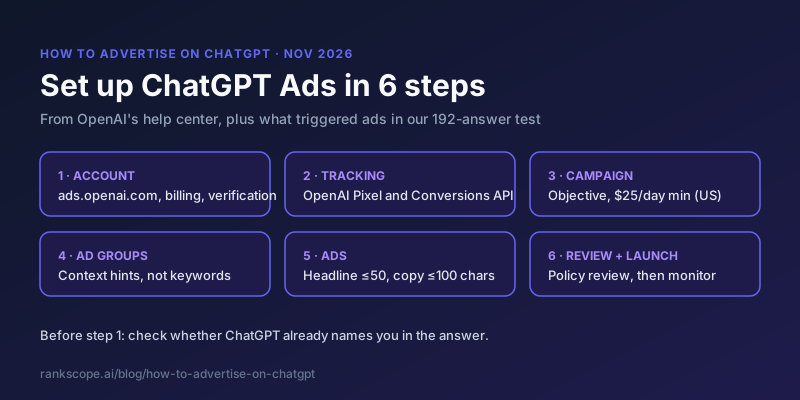
You advertise on ChatGPT through OpenAI's Ads Manager at ads.openai.com. The setup takes six steps, and most of it will feel familiar if you have run Google or Meta ads. Two parts won't: there are no keywords (you write context hints instead), and the ad shows below an answer you don't control.
This guide follows OpenAI's help center as of 14 November 2026. We don't run ChatGPT ads ourselves. Where we add something beyond the docs, it comes from our own test of 192 logged-out ChatGPT answers (the study), and we say so.
Before You Start: Two Checks
- Does ChatGPT already recommend you? Ask it the questions your buyers ask. If it already names you, an ad may buy clicks you'd get anyway. If it names competitors, those are the brands under whose recommendation your ad will sit. Our free AI visibility checker runs this check without an account.
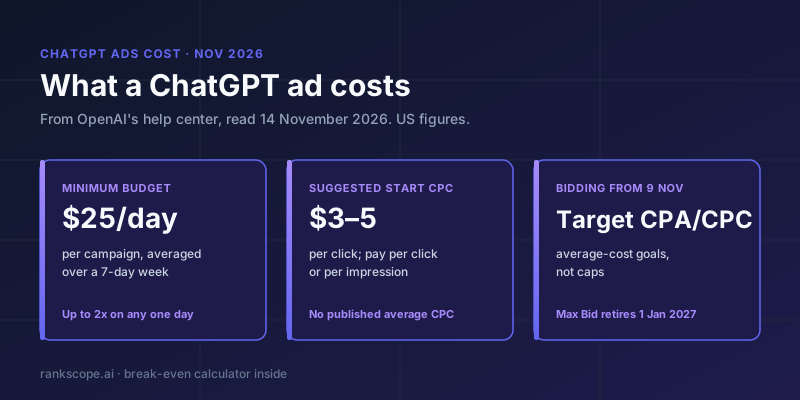
- Can you afford the click? OpenAI suggests starting CPC bids at $3 to $5. Put your conversion rate and order value into our break-even calculator before you set a budget.
What you need ready:
| Requirement | Detail |
|---|---|
| OpenAI account | Sign in with the account you use for ChatGPT, ideally tied to a work email |
| Billing | A card (self-serve) or invoicing. Campaigns can't deliver until billing is set up |
| Verification | Account verification, using your registered legal business name |
| Logo | Shown next to your ads |
| Budget | At least $25 a day per campaign in the US |
| Landing page | Valid, reachable, and not blocking OpenAI's crawlers (OAI-AdsBot and OAI-SearchBot). See AI crawlers |
Step 1: Create Your Ads Manager Account
Go to ads.openai.com and sign in. OpenAI offers two paths (account setup):
- Start from your website URL. Ads Manager drafts a first ad and campaign from your site for you to review.
- Skip straight to Ads Manager and build the campaign yourself.
Then:
- Enter your advertiser name. It fills three fields at first: Account Name (internal), Brand Name (shown on your ads) and Legal Name (used for billing and verification). You can change them separately later, but changing the Brand Name pauses serving until it is reviewed. That is likely why some ads in ChatGPT show company names like "Pipedrive Inc." or "Zocdoc, Inc."
- Check country, currency and time zone carefully. They can't be changed after the account is created.
- Set up billing. A card may get a temporary authorization hold to verify it.
- Add your logo and complete account verification.
- Invite teammates as Admin, Member (create and manage campaigns) or Viewer.
Agencies: create one advertiser account per client, owned by the client, and get invited as users. OpenAI says agencies should not create accounts on behalf of clients, and there is no equivalent yet to Google Ads manager accounts (MarTech).
If you start from your website URL, note OpenAI's warning: those ads can go live once they pass review, and spend can start. Pause the campaign if you aren't ready.
Step 2: Set Up Conversion Tracking
If you want to measure sales or leads, or use the Conversions objective, create a data source in Ads Manager and send events with the OpenAI Pixel, the Conversions API, or both (conversion measurement). The Conversions objective needs at least one supported standard event; custom events aren't supported for optimization yet (conversion-optimized campaigns).
Do this before you launch. A Clicks campaign without tracking will tell you what you paid, not what you got.
Step 3: Create a Campaign
A campaign holds your objective, budget, dates and targeting (creating campaigns).
| Setting | Options | Note |
|---|---|---|
| Objective | Views (CPM), Clicks (CPC) or Conversions | Conversions optimizes toward one standard event, billed per click (oCPC) or per 1,000 impressions (oCPM). You never pay per conversion. The objective can't be changed later |
| Budget | Daily or campaign total | A daily budget is a 7-day average: one day can spend up to twice it, a week never more than seven times it. The budget week runs Sunday to Saturday |
| Minimum | $25 a day in the US | 15 EUR, 15 GBP, 25 CAD, 25 AUD, 725 INR and so on in other currencies |
| Countries | Country, plus states, cities, markets or postal codes where available | To target only the US you must include the US. Excluding other countries isn't enough |
| Platforms | Android app, Android web, Desktop web, iOS app, iOS web | Optional |
| Custom audiences | Include or exclude | Inclusion needs at least 25,000 matched users |
How bidding and the new Target CPA and Target CPC options work is covered in our ChatGPT ads cost guide.
Two traps. New self-serve accounts may only be able to advertise in their home country at first, whatever you select. And on your first campaign you may not see start and end dates until after you publish. OpenAI says not to publish just to reach those settings, because the ads could start running before you set a schedule.
Step 4: Create Ad Groups and Write Context Hints
An ad group is a set of ads around one theme, with its own bid and context hints. This is the part that is new.
Context hints are short, plain sentences that tell OpenAI's system when your ad may be relevant (writing context hints). OpenAI suggests covering:
- What: features, services, pricing, availability or service area
- Who: the needs or circumstances your offering suits
- When: the situations or decisions where it helps
Its own examples:
| Business | Example context hint (OpenAI) |
|---|---|
| Running shoes | Cushioned everyday running shoes for beginners training for their first 5K |
| Local plumber | After-hours residential plumbing in [city], with an $89 service-call fee for urgent repairs |
| Accounting software | Bookkeeping software for growing retailers that need to reconcile online and in-store sales |
Rules from the docs worth knowing:
- One idea per hint, written as a phrase, not a list of keywords.
- Hints aren't targeting rules. People don't need to use your words, and a hint doesn't guarantee your ad appears in a given conversation.
- Hints can't restrict delivery. "Plumbing in Chicago" describes your business; "show this ad only in Chicago" is an instruction the system ignores. Use location targeting for that.
- Split ad groups when use cases need different messaging or landing pages.
Qualifying advertisers can also add Negative Phrases to keep ads away from specific topics.
Test a keyword-style ad group too. OpenAI recommends natural phrases, but one agency that tested both reported that ChatGPT showed the ad from its keyword-list ad group "far more often" than from its full-question ad group, with a slightly higher CTR and lower average CPC (MarTech). That is one test, so run your own: same ads, two ad groups, different hint styles.
What triggered ads in our test
The docs describe how hints are meant to work, and Ads Manager won't show you which conversations triggered your ad. In the words of one early advertiser, "You cannot see any conversation data or even the keywords or conversation themes that may have triggered your ad" (MarTech). So we looked from the user's side. On 14 November 2026 we asked logged-out ChatGPT 100 buying questions, 40 of them three times, and recorded every ad with the line ChatGPT wrote above it. That line shows how the system connected the ad to the question.
Ads showed up under neighbouring questions, not just exact matches.
| Question we asked | Ad that appeared | ChatGPT's line above the ad |
|---|---|---|
| best video conferencing software for small teams | Granola (AI meeting notes) | "For video conferencing notes, here's an AI notepad option to capture meetings." |
| best HR software for a 50-person company | Pebl (employer of record) | "For HR software comparisons for a 50-person team, consider an EOR platform option." |
| best inventory management software for a small retailer | Expert Market (POS deals) | "For small-retailer inventory planning, here's a POS systems option." |
| best dog training app | ONYPETS (anti-barking pendant) | "For finding a dog training app, here's an anti-barking pendant option." |
| best SEO tool for a small business | Storeclaw (AI store growth platform) | "For small-business SEO, here's one AI growth platform option." |
Some questions showed no ad at all. Of the 40 questions we asked three times, 6 never showed an ad, including "best running shoes for beginners", the very use case in OpenAI's example hint. We can't see the auction, so we don't know why. The point stands: a hint describes relevance, it doesn't guarantee an ad.
The same question rarely showed the same advertiser. Where a question showed an ad at least twice, the advertiser changed in 21 of 30 cases.
What that means when you write hints:
- Write for the conversations next to yours. Granola's ad showed under a question about video conferencing, not meeting notes. If your product solves a neighbouring problem, describe that situation in a hint.
- Expect to appear under loose matches, and make the landing page cope. If your ad can show under "dog training app", the page it links to should make sense to someone who asked that.
- Check the answer above your ad. Under 107 of 136 ads we recorded, ChatGPT's answer recommended other brands. Look at what it says for your main questions before you write the ad.
Step 5: Create Your Ads
An ad is the card shown under the answer: brand name and logo, headline, description, image and landing page (creating ads, launch campaigns).
| Element | Limit | OpenAI's recommendation |
|---|---|---|
| Headline | 3 to 50 characters | 16 to 24 characters |
| Description | Up to 100 characters | 32 to 48 characters |
| Image | One image, or 4 to 6 square (1:1) images for multi-image (open beta) | PNG or JPG, square, no larger than 1200 × 1200 for bulk upload |
| Landing page | One URL per ad | A specific product or content page, not the homepage. UTM tags are fine |
OpenAI's guidance is to write several distinct variations per offering, keep copy concrete and benefit-led, and make the headline say what the product does. In our test the median headline was 27 characters; 50 of 136 were inside the recommended 16 to 24.
Decide on creative enhancements. Since 30 October 2026 they are on by default for self-serve campaigns. OpenAI can rewrite your headline and description for the conversation, translate them, resize images and change the destination URL, without approving each version (creative enhancements). If you need exact wording, for legal or brand reasons, opt out in Ads Manager.
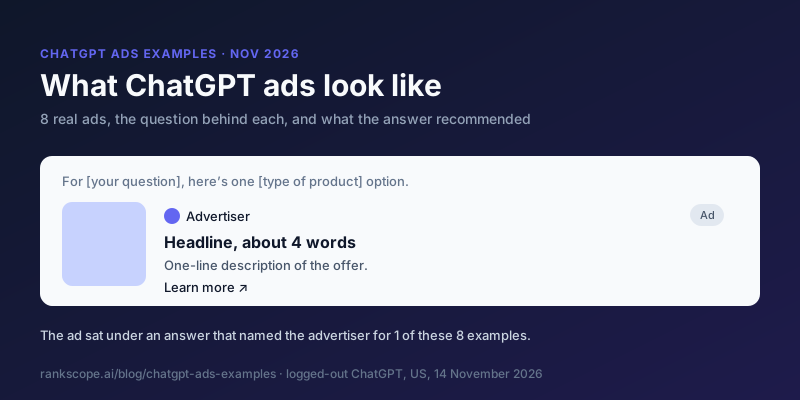
To see what finished ads look like, with the answer above each, see our ChatGPT ads examples.
Step 6: Submit, Launch and Monitor
Every ad is checked against OpenAI's ad policies before it can serve (quickstart). An ad marked "Not serving" shows the reason when you hover over its status; many issues can be fixed and resubmitted.
Once ads are live, Ads Manager reports impressions, clicks, spend, CTR, average CPC and CPM, and conversions if tracking is set up. Two things to know when reading it:
- Impressions, clicks and CTR refresh about every 15 minutes.
- Spend can lag 7 to 8 hours. A $0 spend next to impressions doesn't mean nothing was charged.
What Early Advertisers Report
OpenAI publishes no performance benchmarks. The most detailed first-hand numbers we found come from John Horn, CEO of the agency StubGroup, writing in MarTech in August 2026, before the Target CPA and Target CPC bidding change:
| What he reported | Number |
|---|---|
| Average CPC across industries | $2 to $5 |
| Max CPC that triggers a "may not deliver" warning | Below $3 |
| Conversion rate, same website, about 1,500 users (GA4) | Google Ads 3.71%, ChatGPT Ads 0.21% |
| Engagement time per active user | Google Ads 41 seconds, ChatGPT Ads 17 seconds |
That is one advertiser's site, not a benchmark. But it fits what we saw from the other side: the ad sits under an answer that usually recommends someone else (107 of 136 ads in our test), so the click often comes from someone who was reading about a different brand. Plan your first test as a test: a small daily budget, conversion tracking in place, and a landing page built for the question.
Setup Mistakes to Avoid
| Mistake | Why it matters |
|---|---|
| Publishing your first campaign to find the date settings | Ads can start running before you set a schedule |
| Choosing the wrong country, currency or time zone | They can't be changed after account creation |
| Excluding countries instead of including the US | Exclusions alone don't restrict delivery to the US |
| Picking the wrong objective | Objectives can't be changed; you'd need a new campaign |
| Renaming your Brand Name mid-campaign | It triggers review and pauses serving |
| Writing delivery rules into context hints | Hints describe relevance; the system won't enforce "only" or "never" |
| Reading $0 spend as no spend | Spend reporting can lag 7 to 8 hours |
| Leaving creative enhancements on when copy must be exact | OpenAI can rewrite headlines and descriptions without approval |
Is It Worth It?
OpenAI publishes no performance benchmarks, so the honest answer is to test small and measure. Our cost guide has the pricing and a calculator for your break-even CPC, and our study shows how often advertisers were in the answer above their own ad: 29 of 136 times.
The ad and the answer are separate. OpenAI says ads don't influence the answer, so an ad won't get you recommended. Being in the answer is earned through the sources ChatGPT cites (how to get cited by ChatGPT). Many brands will want both. RankScope tracks the answer side daily across ChatGPT, Google AI Overviews, Google AI Mode and Perplexity, and the free checker shows where you stand today.
For how ChatGPT ads work overall, who sees them and what changed when, see our ChatGPT ads guide.
Frequently Asked Questions
How do I advertise on ChatGPT?
Through OpenAI's Ads Manager at ads.openai.com. Create an advertiser account, set up billing and verification, create a campaign with an objective and budget, add ad groups with context hints, create ads, and submit them for review.
What is the minimum budget for ChatGPT ads?
In the US the minimum daily budget is $25 per campaign. Other currencies have their own minimums, for example 15 EUR, 15 GBP, 25 CAD, 25 AUD and 725 INR, per OpenAI's help center in November 2026.
Can you target keywords in ChatGPT ads?
No. ChatGPT Ads use context hints: plain-language descriptions of what you offer, who it helps and when it is useful, added at the ad group level. OpenAI says people do not need to use the words in your hint, and hints do not guarantee delivery for particular conversations.
Can I target a city or state with ChatGPT ads?
For most campaigns, yes: OpenAI's help center lists states or regions, cities, markets and postal codes where available. New product-feed campaigns support country-level targeting only. Writing a city into a context hint does not restrict delivery to that city.
Can I advertise on ChatGPT outside the US?
Self-serve ChatGPT Ads are available in 89 countries. OpenAI notes that some new self-serve accounts can initially advertise only in their home country, with more countries becoming available as the account builds history.
Can an agency run ChatGPT ads for clients?
Yes, by being invited into the client's own advertiser account as a user. OpenAI says agencies should not create accounts on behalf of clients, and there is no manager-account equivalent yet.
Does advertising on ChatGPT get my brand into the answer?
No. OpenAI says ads do not influence ChatGPT's answers. In our test of 136 ads, the advertiser was named in the answer above its own ad 29 times.