Best AI Search Engines in 2026: Ranked, Tested & Compared
The way people search the web is splitting in two. One half still uses Google — typing keywords, scanning a list of links, clicking through, and piecing together an answer across three or four pages. The other half is asking questions to AI and getting a synthesized answer in seconds.
AI search engines sit squarely in that second half. They don't give you a ranked list to browse — they read the web for you, synthesize it, and answer your question directly. Some do this brilliantly. Others hallucinate, skip citations, or confidently give you outdated information. The difference matters. If you want a primer on how this shift happened and what it means, our explainer on what AI search is covers the fundamentals.
This guide covers the 10 best AI search engines in 2026 — ranked by accuracy, citation quality, real-time data access, and practical usefulness. If you want to understand how AI search affects your brand's visibility specifically, read our guide on AI search engine optimization or jump to the brand visibility section at the end.
Quick Comparison: The Best AI Search Engines at a Glance
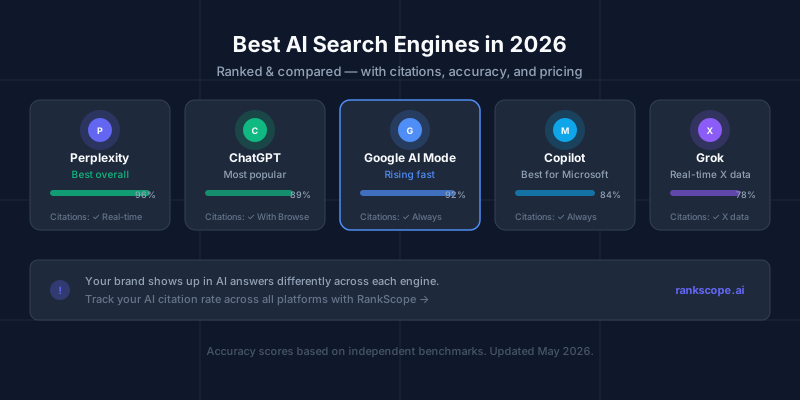
| Engine | Best For | Citations | Real-Time Web | Free Tier | Starting Price |
|---|---|---|---|---|---|
| Perplexity AI | Overall AI search | ✅ Always, inline | ✅ Yes | ✅ Yes | $20/mo (Pro) |
| ChatGPT | Reasoning + writing | ✅ With Browse | ✅ With Browse | ✅ Yes | $20/mo (Plus) |
| Google AI Mode | Google ecosystem users | ✅ Always | ✅ Yes (Google index) | ✅ Free | Free |
| Microsoft Copilot | Structured research | ✅ Always | ✅ Yes (Bing) | ✅ Yes | $20/mo (Pro) |
| Grok | Social/trending topics | ✅ X data | ✅ Real-time X | ✅ Limited | $8/mo (Premium) |
| Claude | Long docs + analysis | ✅ With web search | ✅ Claude.ai | ✅ Yes | $20/mo (Pro) |
| You.com | Source breadth | ✅ Yes | ✅ Yes | ✅ Yes | $15/mo (Pro) |
| Brave Leo | Privacy-first search | ✅ Yes | ✅ Yes | ✅ Yes | Free (built-in) |
| Komo Search | Simple Q&A | ✅ Yes | ✅ Yes | ✅ Yes | $9/mo (Pro) |
| Consensus | Academic research | ✅ Always, papers | Academic index only | ✅ Limited | $9.99/mo |
1. Perplexity AI — Best Overall AI Search Engine
Best for: Anyone who wants the most accurate, well-cited AI search experience available
Perplexity is the only AI tool built from day one exclusively as a search engine — not a chatbot that added search later. That focus shows in the product. Every single response includes inline citations, numbered in the text and expanded in a sidebar, so you can verify any claim in one click. The engine runs real-time web retrieval on every query, not training data from a cutoff date.
What makes Perplexity stand out:
- Inline citation density — not just "sources at the bottom" but numbered superscripts attached to specific claims. This is the standard every other engine should match.
- Pro Search mode — when activated, Perplexity asks clarifying questions before answering, then goes deeper. Genuinely useful for research that requires specificity.
- Spaces — a collaborative research feature letting teams share AI search threads, organize findings, and build on each other's queries.
- Focus modes — switch between general web, academic, YouTube, Reddit, and Wolfram Alpha depending on what kind of source you want.
- Accuracy — in independent benchmarks, Perplexity's accuracy on factual queries consistently sits at 92–96%, outperforming most alternatives.
Limitations: The free tier throttles Pro Search to a handful of queries per day. The interface has more friction than Google — it's designed for research sessions, not quick lookups.
Pricing: Free (with limits) · Pro $20/month · Enterprise POA
If you want to compare Perplexity directly against its own set of competitors — including ChatGPT Search, Google AI Mode, You.com, and Exa — see our dedicated Perplexity competitors guide.
2. ChatGPT (with Browse) — Most Popular, Best Reasoning
Best for: Complex reasoning, multi-step analysis, and users who need writing alongside search
ChatGPT is the most-used AI tool on Earth, with OpenAI reporting 300 million weekly active users as of early 2026. The model's reasoning capabilities — especially with GPT-4o and the o3 series — are unmatched. For questions that require synthesizing ideas, drawing comparisons, or working through multi-step problems, ChatGPT is still the gold standard.
As a search engine, though, it depends entirely on whether you have Browse enabled. Base ChatGPT (without Browse) has a knowledge cutoff and will confidently give you outdated information without flagging it. With Browse turned on, it retrieves current content and provides citations — but the citation format is less systematic than Perplexity's.
What makes ChatGPT stand out:
- Reasoning depth — for complex analytical questions, the o3 model goes further than any competitor. It can reason through multi-step problems before retrieving data.
- Memory — ChatGPT remembers things you've told it across sessions, which means it gets more useful over time for power users.
- Projects — organize different research threads, maintain context per topic, upload documents for reference.
- Canvas and operators — GPT-4o's operator platform means ChatGPT is embedded in hundreds of third-party tools, so search can happen inside the tools you already use.
- Volume — at 300M weekly users, ChatGPT is cited by AI more than any other platform. If your brand appears in ChatGPT's answers, that's massive reach.
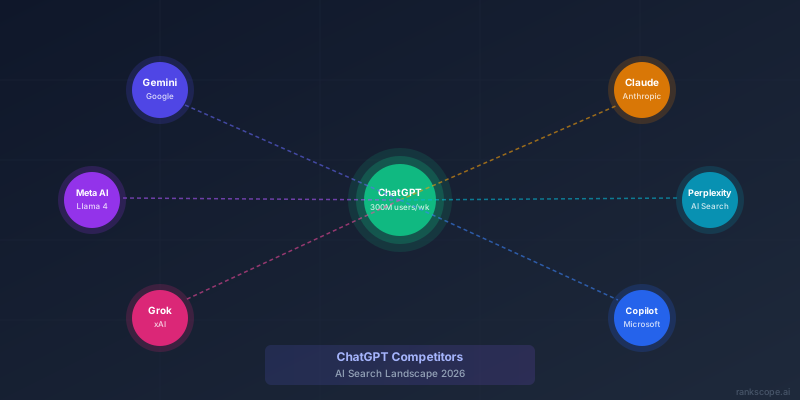
Limitations: Citations only appear with Browse enabled. Without Browse, you get no sources and potentially stale data. Many users are on the free tier, which doesn't include Browse. ChatGPT's knowledge cutoff is also worth understanding — recent events are only visible with web search active. For a deeper comparison of how ChatGPT stacks up against Gemini, Claude, and Perplexity, see our full ChatGPT competitors guide.
Pricing: Free (GPT-4o mini, limited) · Plus $20/month (Browse, GPT-4o) · Pro $200/month (o3, extended thinking)
3. Google AI Mode — Rising Fast, Most Integrated
Best for: Users already in the Google ecosystem who want AI answers without switching apps
Google AI Mode is Google's full-conversational AI search layer, built on Gemini 2.5 Pro and integrated directly into google.com. It's different from AI Overviews (which appear in standard search results) — AI Mode is a dedicated conversational interface that replaces the traditional results page with a Gemini-generated response that draws on Google's full index, Knowledge Graph, and real-time crawl.
Rolling out widely in the US throughout 2026, AI Mode represents Google's most direct response to Perplexity's growth. The underlying index advantage is enormous — no AI search engine has access to more web data than Google.
What makes Google AI Mode stand out:
- Index depth — Google's crawl and index is decades ahead of any competitor. When AI Mode retrieves sources, it has access to a breadth of content that Bing-based engines simply don't.
- Knowledge Graph integration — entity-based answers draw on Google's structured knowledge about people, products, brands, places, and concepts. Factual accuracy on entities is the best of any engine.
- Seamless integration — if you use Gmail, Maps, Calendar, and Google search daily, AI Mode slots into your existing workflow with zero friction.
- Shopping and local — AI Mode inherits Google's dominance in local search and shopping queries. No other AI engine comes close for "best coffee shop near me" or "compare these two refrigerators."
- Citation format — inline citations on every response, linked to specific sources, with a "show more" sources panel.
Limitations: Still rolling out — not available in all regions as of May 2026. Gemini has historically struggled with very recent events (sub-24-hour recency) compared to Perplexity's speed. Privacy-conscious users will note that Google's data collection is extensive.
Pricing: Free (included in Google Search) · Google One AI Premium $20/month (Gemini Advanced)
For marketers: Google AI Overviews — the summary boxes that appear in standard search results — are a separate surface from AI Mode, but both draw on similar retrieval signals.
4. Microsoft Copilot — Best-Structured, Always-On Citations
Best for: Professional research, comparison tasks, users in the Microsoft 365 ecosystem
Microsoft Copilot (the web version at copilot.microsoft.com, and the integrated Windows/Edge version) runs on GPT-4 with Bing-powered real-time retrieval. It's consistently one of the cleanest AI search experiences: formatted responses, comparison tables, and clickable citations on every answer — no toggles required.
Where Copilot really shines is in structured, professional research. If you ask Copilot to compare two software products, you get a properly formatted table with sourced claims. Ask it to summarize a news topic and you get bullet points with numbered sources alongside. The formatting alone puts it ahead of several competitors.
What makes Copilot stand out:
- Always-on citations — unlike ChatGPT, web retrieval and citations are on by default for every query. You don't need to know to turn on Browse mode.
- Table-first formatting — Copilot defaults to tables and structured lists for comparison queries, which is genuinely more readable than wall-of-text competitors.
- Microsoft 365 integration — the enterprise version has access to your internal documents, emails, and Teams conversations. For business research, this is powerful.
- Image generation — DALL-E 3 image creation built in, which is useful alongside research.
- Edge and Windows — Copilot appears as a sidebar in Microsoft Edge, so web research and AI assistance live side by side without tab switching.
Limitations: Bing's index is smaller than Google's, which occasionally shows up in source quality on niche topics. Copilot can be more conservative than Perplexity or ChatGPT on opinion or analysis — it hedges heavily on anything remotely controversial.
Pricing: Free (generous) · Pro $20/month (Microsoft 365 Copilot integration)
5. Grok (xAI) — Best for Real-Time Social and Trending Topics
Best for: Staying on top of news, social trends, and anything moving fast on X (Twitter)
Grok is Elon Musk's AI, built by xAI and integrated into X (formerly Twitter). The defining capability is real-time access to the full X/Twitter firehose — every tweet, trend, and breaking news story as it happens. No other AI search engine has this access.
For questions where recency matters — "what are people saying about [topic] right now?", "what happened in the last hour on [news story]?" — Grok has a genuine edge. It also tends to be less hedged and more direct than corporate AI assistants, which some users prefer.
What makes Grok stand out:
- X/Twitter firehose access — real-time access to millions of posts per minute. Unmatched for social sentiment, breaking news, and trending topics.
- Grok 3 — xAI's latest model is competitive with GPT-4o on general reasoning benchmarks. The model quality has improved significantly since launch.
- Less hedging — Grok is more willing to give a direct opinion or speculative take than Google or Microsoft's offerings.
- "Fun mode" — Grok has a personality. It's less suited for formal research but more engaging for casual exploration.
- Image understanding — strong multimodal capabilities, can analyze images and charts alongside search queries.
Limitations: The citation quality outside X/Twitter data is weaker than Perplexity or Copilot. Web retrieval (from the broader internet) is less comprehensive. Free tier is significantly limited — full Grok 3 access requires X Premium.
Pricing: Limited free tier · X Premium $8/month (Grok standard) · X Premium+ $16/month (Grok 3)
6. Claude (Anthropic) — Best for Long-Form Research and Document Analysis
Best for: Analyzing long documents, academic research, nuanced multi-source synthesis
Claude from Anthropic isn't primarily a search engine — it's a conversational AI that added web search capabilities in Claude.ai. But for a specific set of research tasks, it's the best tool available: analyzing long documents (200,000 token context window), synthesizing nuanced topics from multiple perspectives, and producing unusually careful, hedged analysis.
The web search feature, available in Claude.ai Pro, retrieves real-time sources and incorporates them into responses. What sets Claude apart is how it handles uncertainty — it's more honest than most competitors about what it doesn't know, which makes it more trustworthy for research where accuracy matters.
What makes Claude stand out:
- 200K token context window — upload entire research reports, PDFs, or long documents for analysis alongside web search. No other mainstream AI can handle this much content simultaneously.
- Calibrated uncertainty — Claude tells you when it's unsure and flags which claims need verification. This is genuinely valuable for research.
- Nuanced analysis — for questions that involve trade-offs, interpretations, or ethical dimensions, Claude gives more careful, balanced answers than most alternatives.
- Artifacts — Claude can produce formatted documents, code, and structured reports as part of a response, not just inline text.
- Privacy — Anthropic's data practices are more conservative than Google or Meta. Claude doesn't use your conversations to train models by default.
Limitations: Web search isn't the default interface — you need to know to invoke it. Citation display is less visual and inline than Perplexity. Not built for quick lookups; more suited to deep research sessions.
Pricing: Free (Claude 3 Haiku, no web search) · Pro $20/month (Claude 3.5/3.7 Sonnet, web search) · Max $100/month (opus models, extended)
7. You.com — Best Source Breadth and Modular Research
Best for: Users who want to choose their source type or research mode per query
You.com is a customizable AI search engine that lets you pick which "apps" or modes to use per query: general web, academic papers, code, news, Reddit, and more. It pulls from a wider variety of source types than most competitors and lets you configure how AI-heavy versus link-heavy your results are.
The search quality is solid if not class-leading. What distinguishes You.com is the flexibility — you can dial up source breadth, prioritize academic results, or switch to a coding assistant within the same interface.
What makes You.com stand out:
- Source diversity — you can explicitly include Reddit, news, academic, or code sources in a single query. More control than any other engine.
- YouCode — a dedicated coding search mode that retrieves from documentation, GitHub, and Stack Overflow specifically.
- YouWrite — AI writing assistance alongside search, within the same workflow.
- Custom instructions — set system-level preferences for how you want results formatted or what sources you prefer.
Limitations: The overall quality of synthesis is a step below Perplexity and Copilot. The modular interface can feel complicated for simple lookups. Less polished than competitors.
Pricing: Free (limited) · Pro $15/month
8. Brave Leo — Best Privacy-First AI Search
Best for: Privacy-conscious users who want AI search without tracking
Brave's built-in AI assistant Leo runs inside the Brave browser and uses Brave Search's independent index (not Google or Bing). Leo can answer questions with real-time web context while applying Brave's ad-blocking and tracker-blocking to all sources. No data is sent to third-party AI APIs unless you opt into it.
The underlying model — Mixtral 8x7B or Llama 3 by default — is open-source and runs on Brave's infrastructure. You can optionally use Claude or GPT-4 through Leo if you prefer, with those APIs called privately.
What makes Brave Leo stand out:
- True privacy — Brave Search builds its own index. Results don't depend on Google or Bing. Brave's crawler doesn't fingerprint users.
- No conversation history by default — Leo doesn't store your queries between sessions.
- Free with Brave browser — the base Leo experience costs nothing, which is rare among quality AI search tools.
- Independent search index — Brave's index means your search behavior isn't feeding Google or Microsoft's ad systems.
Limitations: Index breadth is significantly smaller than Google or Bing. For niche or highly recent topics, you'll sometimes hit gaps. The model quality (default open-source models) is a tier below GPT-4o or Gemini.
Pricing: Free (Leo basic) · Leo Premium $15/month (Claude access, higher limits)
9. Komo Search — Best Clean Perplexity Alternative
Best for: Users who want Perplexity-style AI search with community features and a simpler interface
Komo is a lightweight AI search engine with a cleaner interface than Perplexity and a community Q&A layer that surfaces answers others have found useful. It's less feature-dense, which makes it faster and less overwhelming for users who want AI answers without a research dashboard.
Accuracy is solid. Komo handles most factual queries well, cites sources (though less systematically than Perplexity), and responds quickly. The community layer adds a curated "what have others found useful" dimension to results that no other engine offers.
What makes Komo stand out:
- Clean interface — less visual noise than Perplexity. Better for users who want an answer, not a research environment.
- Community answers — see how other users phrased similar questions and what answers they found useful.
- Fast — consistently among the fastest response times in the category.
Limitations: Smaller feature set than Perplexity. Pro tier offers fewer modes and tools than Perplexity Pro Search. Less mature overall.
Pricing: Free (limited) · Pro $9/month
10. Consensus — Best for Academic and Scientific Research
Best for: Researchers, students, and professionals who need peer-reviewed sources
Consensus indexes 200 million scientific papers and lets you query that index with AI. Unlike every other engine on this list, Consensus doesn't crawl the general web — it only surfaces results from academic literature. Every citation is a real paper with a DOI.
For research questions that need evidence-based answers ("what does the research say about X?"), Consensus is in a different category. The AI identifies consensus across papers (hence the name), notes disagreements, and flags study quality. Standard AI search engines can't do this reliably — they might cite a low-quality study with the same confidence as a landmark meta-analysis.
What makes Consensus stand out:
- 200M indexed papers — the deepest academic index of any AI search tool.
- Consensus meter — shows what percentage of relevant studies agree on a claim.
- Study quality indicators — Consensus flags sample sizes, study design, and journal tier, which is critical context.
- Copilot integration — Consensus results can feed into Microsoft Copilot for combined academic + web research.
Limitations: Completely useless for non-academic questions. Knowledge stops at publication dates — very recent research (last 3–6 months) may not be indexed yet. Not a general web search replacement.
Pricing: Free (limited) · Premium $9.99/month · Teams custom
How AI Search Engines Actually Work
Most AI search engines follow the same basic process, with variations in the details:
- Query processing — the engine interprets your natural language question, often using an LLM to identify intent, entities, and what kind of answer you're looking for.
- Retrieval — the engine queries an index (its own or a partner's) for the most relevant documents. Some engines also query multiple specialized sources (academic databases, social platforms, news APIs).
- Reading + synthesis — retrieved documents are fed to an LLM, which reads them and generates a coherent response that synthesizes the information.
- Citation — good engines attach source references to specific claims. Poor ones dump a list of links at the bottom or skip citations entirely.
- Response — the user sees the synthesized answer, ideally with inline citations and a sources panel.
The key variable is retrieval quality — what's in the index, how fresh it is, and how well the engine matches your query to the right sources. This is where Google's index advantage matters enormously. It's also why Perplexity's dedicated search infrastructure beats "chatbot with search added" options for many use cases.
AI Search and Google's AI Overviews: How They Differ
Google AI Overviews are often confused with AI search engines. They're related but different:
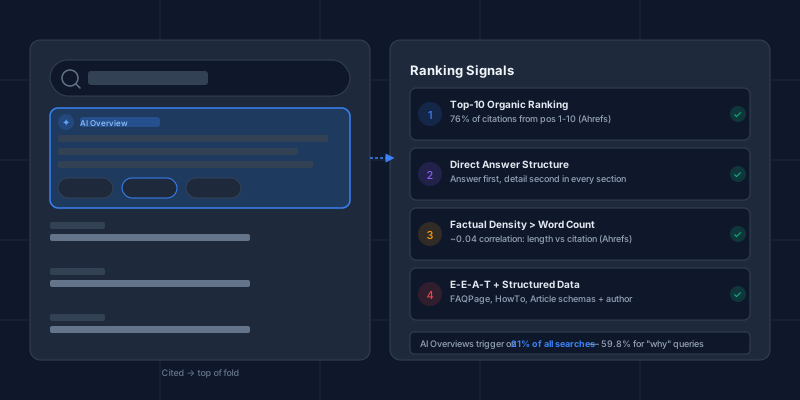
- Google AI Overviews appear at the top of standard Google Search results for informational queries. They summarize 3–5 sources from Google's index and are embedded into the traditional search results page.
- Google AI Mode is Google's fully conversational AI search experience — a separate interface where the entire response is AI-generated, like Perplexity.
- Standalone AI search engines (Perplexity, Copilot, etc.) exist outside of Google's search results entirely.
For marketers and SEOs, this distinction matters significantly. Ranking in Google's top 10 is still the prerequisite for appearing in AI Overviews — but it has almost no relationship to whether you appear in Perplexity or ChatGPT answers. Each engine has its own citation logic. For a thorough explanation of what AI Overviews are, how they've evolved, and how Google selects sources, see What Are AI Overviews? The Complete Guide. For specific ranking tactics, see our guide on how to rank in Google AI Overviews.
What AI Search Means for Your Brand
Here's something most people writing about AI search engines miss: each of these platforms is independently deciding whether your brand gets cited when someone asks a relevant question.
Someone asks Perplexity "what's the best tool for tracking my brand in AI?" — does your product appear? Someone asks ChatGPT "compare the top GEO tools" — are you in the list? These aren't hypothetical — this is how real buyers are researching software, services, and products right now.
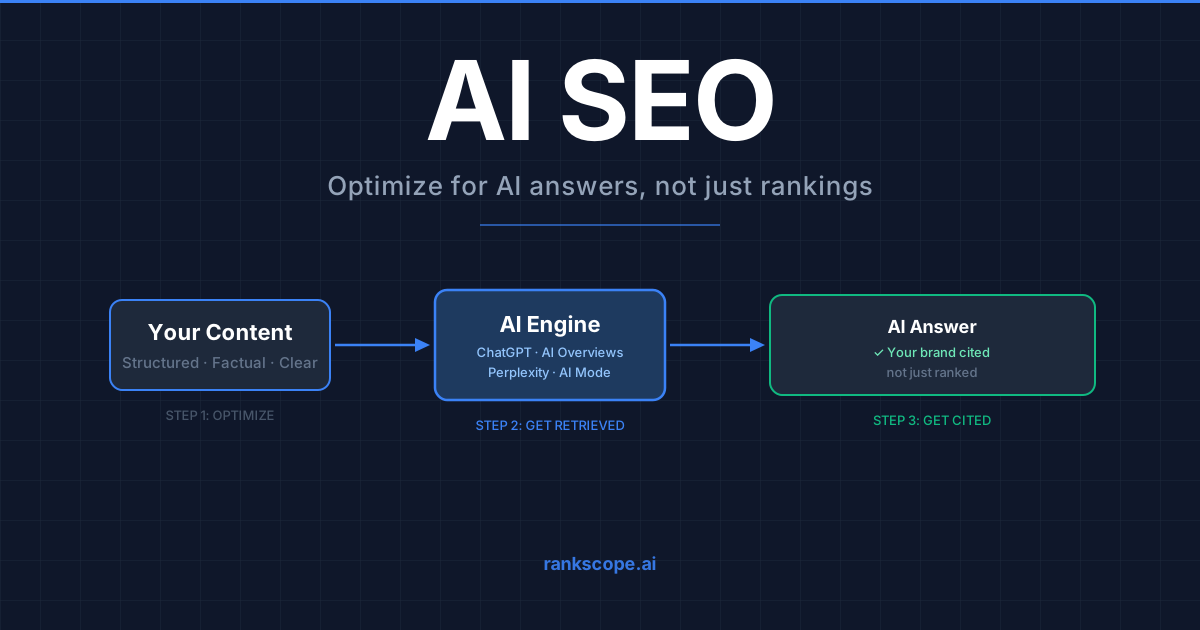
The discipline for getting your brand cited in AI answers is called generative engine optimization (GEO). It's different from traditional SEO:
| Traditional SEO | GEO (AI Citation Optimization) | |
|---|---|---|
| Goal | Rank in Google's top 10 | Be cited in AI-generated answers |
| Key signals | Backlinks, domain authority, keywords | Entity clarity, factual density, third-party mentions |
| Success metric | Keyword rankings, organic traffic | Citation rate, share of voice in AI |
| Measured by | Google Search Console | Dedicated AI citation tracking (RankScope, etc.) |
| Platforms | Google, Bing | ChatGPT, Perplexity, Gemini, AI Overviews, AI Mode |
The problem is that most brands have no idea whether they appear in any of these engines. Google Search Console doesn't track AI citations. There's no ranking report for "did ChatGPT mention you this week?"
That's what RankScope tracks — your citation rate, share of voice, and brand mentions across ChatGPT, Google AI Overviews, Perplexity, and Google AI Mode, with daily monitoring and forensic diff detection when answers change.
How to Choose the Right AI Search Engine
The right answer depends on what you're trying to do:
For general daily research: Start with Perplexity. The citation quality alone makes it worth the switch from Google for anything that needs sources.
For complex multi-step reasoning: ChatGPT with Browse, especially on Plus or Pro. The o3 model handles genuinely hard problems that simpler engines fumble.
For staying in the Google ecosystem: Google AI Mode, which is rolling out as the default search experience in 2026 for many users.
For professional/business research: Microsoft Copilot, especially if you're in a Microsoft 365 environment. The table formatting and always-on citations are excellent.
For breaking news and social trends: Grok. Real-time X data is the only source that updates faster than a news cycle.
For academic or scientific questions: Consensus, full stop. Nothing else comes close for evidence-based research.
For privacy: Brave Leo. It's the only major AI search tool with a genuinely independent index and no data sharing by default.
The Bottom Line
AI search engines aren't a fad — they're the next major shift in how people find information online. Perplexity processes over 100 million queries per day as of early 2026. ChatGPT has 300 million weekly active users. Google is rebuilding its search product around Gemini from the ground up.
If you're a researcher, the tools are genuinely good now — especially Perplexity and Copilot. If you're a brand or marketer, your visibility in AI search answers is a separate metric from your Google rankings, and the window to build that advantage before it gets competitive is right now.
For more on how to optimize your brand's presence across AI search platforms, start with our complete guide to generative engine optimization, see our comparison of the best AI visibility tools for tracking where your brand stands, or browse our LLM SEO tools guide for a deeper look at the tracking and optimization platforms available.
If you want to know where your brand stands right now across ChatGPT, Google AI Overviews, Perplexity, and AI Mode — RankScope tracks all four starting at $49/mo, no setup fee, cancel anytime.
Last updated: May 2026. Pricing and features change frequently — verify directly with each provider.