ChatGPT for SEO: How to Use ChatGPT to Improve Your Search Rankings
There are two completely different things people mean when they say "ChatGPT for SEO."
The first is using ChatGPT to get cited by ChatGPT — that's a GEO strategy, covered in depth in our posts on how to get your brand cited by ChatGPT and how to rank in ChatGPT.
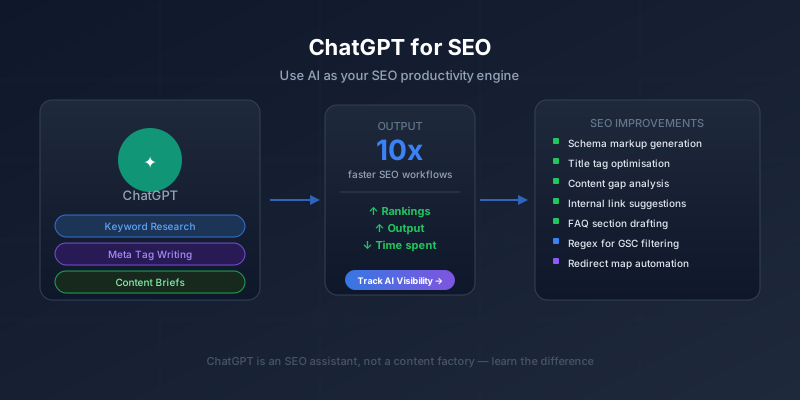
The second is what this post is about: using ChatGPT as an SEO productivity tool — to do your keyword research faster, write better meta tags, build content briefs, generate schema markup, and cut hours off work that used to take forever.
These are fundamentally different goals. The first is about your content strategy for AI visibility. The second is about your day-to-day SEO workflow. Both matter, but confusing them leads to a lot of wasted effort.
This guide covers the second one. Here's exactly where ChatGPT earns its keep in an SEO workflow — and where it doesn't.
What ChatGPT Can Actually Do for SEO (And What It Can't)
Before diving into tactics, let's be honest about the limitations. Most "ChatGPT for SEO" guides skip this part and then you're disappointed when the thing doesn't work.
ChatGPT cannot:
- Tell you a keyword's actual search volume or difficulty (it has no access to live search data)
- Check whether your site is indexed, crawled, or has technical errors
- See your Google Analytics, Google Search Console, or any real traffic data
- Predict how Google will rank your content
- Replace the original human expertise that earns rankings
ChatGPT can:
- Brainstorm keyword ideas and question-based variants you hadn't thought of
- Write title tags and meta descriptions quickly and at scale
- Build content outlines from research you've already done
- Generate FAQ sections, HowTo schema, and JSON-LD markup
- Write regex patterns for GSC filtering
- Audit whether your content answers what it promises to answer
- Suggest internal link anchor text given a list of your pages
- Draft redirect maps from old URL structures to new ones
- Help debug code for technical SEO automations
The through-line: ChatGPT is a writing and logic assistant, not a data analyst. Where the task is "write this specific thing in this format," it's excellent. Where the task is "tell me the data," you need an actual data source.
The 8 Best ChatGPT Use Cases for SEO
1. Keyword Brainstorming and Clustering
ChatGPT is genuinely useful for expanding a seed keyword into a full keyword universe. It knows how people phrase questions, what related topics exist, and what semantic variants of a query look like.
A prompt that works well:
"I'm targeting the keyword [target keyword]. Give me: (1) 10 question-based variants someone might search, (2) 5 comparison-style keyword variations, (3) 5 'best/top' style variations, (4) 3 commercial intent variations. Format as a table."
The output gives you a starting list that you'd validate with a real tool like Ahrefs, DataForSEO, or Google Keyword Planner before committing. ChatGPT's keyword ideas are brainstorming — they're not ranked by volume or difficulty, and some of them won't have meaningful search traffic. But the brainstorm step goes from 30 minutes to 5 minutes.
Keyword clustering is another strong use case. Paste a list of 50–100 keywords and ask ChatGPT to group them by search intent (informational, commercial, navigational, transactional) and topic cluster. It won't be perfect, but it's a solid first pass that you refine — faster than clustering manually.
2. Writing Title Tags and Meta Descriptions at Scale
This is one of the clearest wins. Title tags and meta descriptions are repetitive, format-constrained writing tasks — exactly what ChatGPT is good at.
Give it context and constraints:
"Page: [describe what the page does or covers]. Target keyword: [keyword]. Write 5 title tag options under 60 characters that include the keyword and a benefit or hook. Then write 3 meta description options under 155 characters."
You pick the best one, maybe tweak a word or two, and you're done. For a site with 30 pages that need fresh metadata, this turns a full day of work into two hours.
A few rules to keep:
- Always include the target keyword in the title tag, ideally near the front
- Meta descriptions don't directly affect rankings, but they affect click-through rate — they're ad copy, not just summaries
- Never use a ChatGPT output verbatim without reading it critically — it occasionally makes things up or produces awkward phrasing
3. Building Content Briefs
A content brief is the document you (or a writer) follow when creating a post. It specifies the target keyword, the intended audience, the H2/H3 structure, the key points each section must cover, and the internal links to include.
Building these manually — which means reviewing SERP results, understanding what competitors cover, identifying gaps — takes 45–90 minutes per post. ChatGPT can cut that to 20 minutes if you feed it the right inputs.
Here's the workflow:
- Research the SERP yourself (or with a tool like DataForSEO): note the top 3 ranking pages and what they cover
- Feed ChatGPT: "I want to write a post targeting [keyword]. The top results currently cover [summary of what you found]. My site's angle is [your differentiator]. Create a full H2/H3 content outline with a one-sentence summary of what each section should contain. Include a FAQ section with 5 specific questions searchers would ask."
- Review the output, rearrange what doesn't make sense, add any angles the model missed
The brief ChatGPT produces is a starting scaffold — you're the expert who knows what depth is needed, what specific data to include, and what makes the content worth reading. ChatGPT saves the structural legwork.
4. FAQ Section Generation
FAQ sections are high-value SEO content for two reasons: they target long-tail question keywords, and they're ideal candidates for FAQPage schema (which can win featured snippet placement in Google).
The workflow:
- Tell ChatGPT your topic and target audience
- Ask it to generate 8–10 specific questions someone would have after reading your post
- Write the answers yourself (this is the part that requires your expertise)
- Then ask ChatGPT to format the Q&A pairs as valid FAQPage JSON-LD schema
The answers must be human-written. Generic AI answers in FAQ sections are obvious, thin, and don't earn citations. But the question generation and schema formatting? Let ChatGPT handle those. Every post on our blog has a FAQ section built this way — it's one of the most consistent things we do for GEO-optimized content.
5. Generating JSON-LD Schema Markup
Schema markup is a known ranking signal, improves rich result eligibility, and — as we cover in depth in our GEO content standards — makes your content more extractable by AI systems. The problem is that JSON-LD syntax is finicky and writing it by hand is error-prone.
ChatGPT handles this extremely well. Describe the page and its content, specify the schema type, and it outputs valid JSON-LD that you paste into your page. Schema types where this saves real time:
- Article / BlogPosting — requires author, datePublished, headline, publisher
- FAQPage — list your Q&A pairs and it formats them correctly
- HowTo — list your steps and it creates a proper HowToStep array
- BreadcrumbList — give it your URL path and page names
- SoftwareApplication — for tool/product pages
Always validate the output with Google's Rich Results Test before deploying. ChatGPT makes occasional schema errors (wrong property names, missing required fields) — the validator catches these in seconds.
6. Regex Patterns for Google Search Console
This is a niche use case, but for anyone who uses GSC's regex filter, it's a significant time-saver. Regex is powerful but syntax-unfriendly — most SEOs need to look up the pattern every time they use it.
Tell ChatGPT exactly what you want to filter for:
"Write a Google Search Console regex that matches queries containing any of these words at the start: how, what, why, when, where, does, can. Queries should begin with one of these words."
Or more specific:
"Write a regex that matches any query containing 'alternative' or 'vs' or 'comparison'."
You get clean, copy-paste-ready regex that works. Then in GSC, apply it under the Query filter to isolate the subset of your traffic you care about.
7. Internal Link Suggestions
Give ChatGPT:
- The title and URL of every page on your site (a simple list)
- The content of the page you just wrote
- The instruction: "Suggest 5 internal links I should add to this page. For each, specify which paragraph to add the link in, the exact anchor text to use, and the destination URL."
It reads the new content, maps it against your page list, and identifies contextually appropriate opportunities. It won't know which of your existing pages have the most authority or inbound links, so you still prioritize based on your own data. But for a site that's publishing regularly, having a fast internal linking first pass is valuable.
8. Redirect Map Building
When you're restructuring a site's URL architecture — moving from /blog/post-name to /resources/post-name, for example — you need a redirect map that covers every old URL. Missing redirects break your link equity and create 404s.
Give ChatGPT your old URL list (paste it in) and your new URL pattern, and ask it to generate the complete 301 redirect mapping as an .htaccess file, Cloudflare redirect rule, or Nginx config block. For sites with 50–200 URLs, this is a 2-minute task instead of a 2-hour one. Verify the output before deploying, but it's almost always correct.
The ChatGPT Use Cases That Don't Work for SEO
Writing entire blog posts for direct publication
This is the big one. The appeal is obvious — it's fast, it's cheap, and the output looks professional at first glance. But:
- It's generic. ChatGPT writes from statistical patterns in training data, not from expertise. It produces the average of what's already been written on a topic — and "average" doesn't earn rankings or build authority.
- It lacks specific facts. Good SEO content cites specific numbers, original data, named tools, real examples. ChatGPT invents plausible-sounding specifics that are often wrong.
- It's detectable. By 2026, both Google's quality raters and AI content detection tools have become significantly better at identifying mass-produced AI content. Sites that publish it at scale have faced ranking drops.
- It doesn't build your brand. Every published post is a chance to demonstrate expertise and perspective. A ChatGPT post has neither.
Use ChatGPT to speed up skilled writing, not to replace it. The final output should sound like a person wrote it — because, for the important parts, a person should have.
Keyword research without data validation
ChatGPT will confidently tell you that "chatgpt for seo" gets 50,000 monthly searches. It might actually get 590. There's no way to know without checking a real data source. Keyword research from ChatGPT alone will have you targeting the wrong terms with wrong difficulty estimates.
Competitor analysis
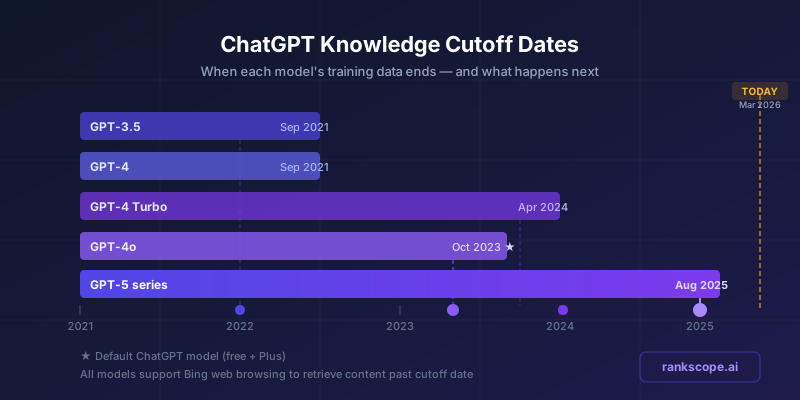
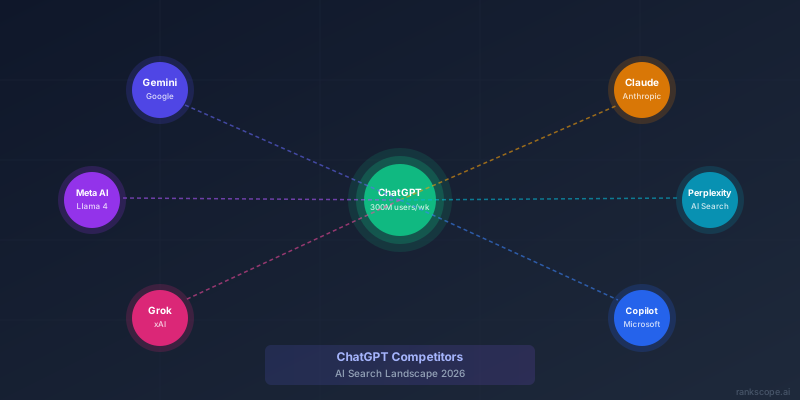
"Who are the top competitors for [X] keyword?" ChatGPT will give you a list — and it will be based on its training data, which has a cutoff date. The SERP today may look completely different. See our guide on ChatGPT's knowledge cutoff for exactly why this matters. Always check the live SERP for any competitive analysis that matters. And if you want to understand how ChatGPT itself compares against Google Gemini, Claude, and Perplexity as AI platforms, our ChatGPT competitors guide covers that in depth.
Technical audits
ChatGPT cannot crawl your site, read your server logs, or access your GSC data. It cannot tell you whether your pages are indexed, whether you have duplicate content issues, or why a specific page isn't ranking. For technical SEO diagnosis, you need Screaming Frog, GSC, or a specialist.
Using ChatGPT as an LLM Self-Test for GEO
This one is slightly different from the rest — it's about AI visibility rather than Google rankings, but it belongs here because it uses ChatGPT directly as an auditing tool.
The LLM self-test: paste your full page content into ChatGPT and ask, "Summarise this article in 5 bullet points."
If the summary accurately captures your key claims — the most important facts, the main distinctions, the actionable conclusions — your content is structured well for AI extraction. If ChatGPT misses something important, the section that covers it is buried, unfocused, or poorly framed.
This is the single best proxy test for whether ChatGPT, Perplexity, Gemini, and other AI systems will actually extract and cite your content. Every post we publish at RankScope goes through this test before it goes live. It's also built into our GEO checklist as a required step.
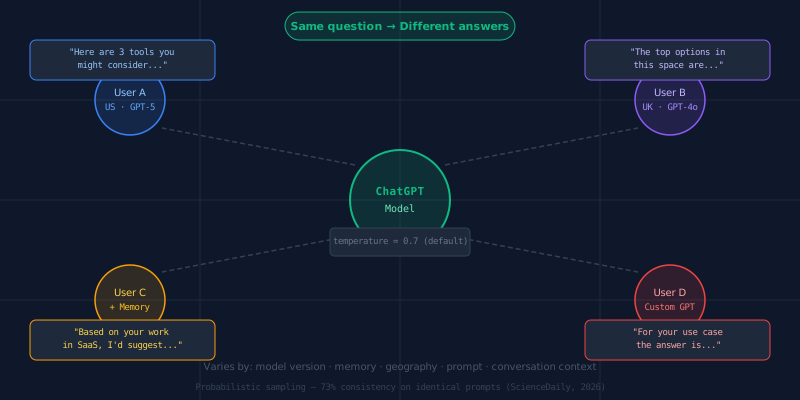
One important nuance: ChatGPT doesn't give the same answer to everyone, so run your self-test a few times across different sessions to confirm consistency — not just once.
The fix when ChatGPT misses something: put the key claim in the first sentence of the relevant section, use a heading that directly states the point, and make the fact specific and verifiable.
The Right Mental Model: ChatGPT as SEO Assistant, Not SEO Autopilot
The mistake most people make with ChatGPT for SEO is treating it like an autopilot — feed it a keyword, get a finished piece. That's not what it is.
Think of it as an assistant that's very fast, very available, and competent at specific bounded tasks. Give it clear instructions, specific inputs, and constrained formats. Review everything it outputs. Bring your own expertise to the parts that require judgment.
Used that way, it genuinely does cut time in half on the mechanical parts of SEO — the schema writing, the meta tag generation, the FAQ structuring, the redirect mapping. That's real and it compounds: if you ship twice as much optimized content in the same time, your SEO trajectory changes.
The parts that require actual thinking — the strategic keyword choices, the editorial direction, the original arguments, the specific data — those still require you. ChatGPT doesn't replace SEO expertise. It multiplies it.
Tracking What's Actually Working
Once you've used ChatGPT to ship better-structured content faster, you still need to measure the results. Google Search Console tracks traditional keyword rankings and click performance. But if you're also optimizing for AI search visibility — whether ChatGPT, Gemini, Perplexity, or the others are citing your brand — you need a different measurement layer.
That's what RankScope tracks: citation rate, share of voice, and sentiment across all four major AI engines. Traditional SEO tools tell you if you ranked on Google. RankScope tells you if you're getting named in AI-generated answers — the new search surface where generative engine optimization (GEO) matters.
Used together, ChatGPT as a production tool and RankScope as a measurement platform give you the complete picture: optimized content going out faster, real visibility data coming back in.
Frequently Asked Questions
Can ChatGPT do keyword research?
ChatGPT can brainstorm keyword ideas, suggest related terms, and identify question-based variants of a target keyword. However, it cannot provide accurate search volume, keyword difficulty, or CPC data — it has no access to live search data. Treat ChatGPT keyword output as a brainstorming starting point, then validate every keyword with a real data source like Google Keyword Planner, Ahrefs, DataForSEO, or SEMrush before committing.
Should I use ChatGPT to write blog posts for SEO?
Not as a direct output. ChatGPT-generated blog content published without significant human editing tends to be generic, factually imprecise, and identifiable. Google's ranking systems reward original, expert-level content. Use ChatGPT to accelerate your process — outlines, first drafts to restructure, FAQ generation — but write the final version with genuine expertise and specific facts.
What is the best way to use ChatGPT for technical SEO?
The highest-ROI technical SEO uses are: generating regex patterns for Google Search Console filters, writing JSON-LD schema markup (Article, HowTo, FAQPage, BreadcrumbList), creating redirect mapping logic when restructuring URLs, and writing hreflang snippets for multilingual sites. These tasks are repetitive and syntax-sensitive — ChatGPT handles them faster and with fewer errors than doing them manually.
How is using ChatGPT for SEO different from getting cited by ChatGPT?
Using ChatGPT for SEO means using it as a productivity tool to improve your Google rankings — keyword research, content briefs, schema generation. Getting cited by ChatGPT (GEO) means optimizing your content so ChatGPT mentions your brand when answering relevant questions. The first is about your workflow; the second is about your content strategy for AI visibility. Both matter, but they require separate approaches. For the second goal, see how to rank in ChatGPT: complete guide and how to get your brand cited by ChatGPT.
Can ChatGPT help with internal linking?
Yes — give ChatGPT a list of your published pages (titles and URLs) and the content of a new post, and ask it to suggest 3–5 internal links with appropriate anchor text. It won't know which pages have the most authority or traffic, so you still need to prioritize based on your own data. But for generating contextually appropriate anchor text quickly, it works well.
Does using ChatGPT for content hurt your Google rankings?
Google's position is that it rewards helpful, high-quality content regardless of how it was produced — AI-written content is not automatically penalised. The problem is that AI-generated content published without editing tends to be generic and low-quality, and that is what gets penalised. The tool isn't the problem; the output quality is. Use ChatGPT to speed up skilled humans, not to replace the human judgment that makes content actually useful.